

ONE Blackjack is a casino-banked game, meaning that players compete against the house rather than each other. The game allows unlimited players to be seated at the table. The Dealer deals 2 face up cards to the players and two cards to themselves, one face up and another face down (the hole card).
The objective is to get closer to a total of 21 than the Dealer by taking additional cards if needed but without exceeding 21 (Too Many). Any hand that goes over 21 automatically loses to the Dealer, regardless of the Dealer’s own hand. But if you get a total of 21 from your initial two cards, it is known as a “Blackjack”, and nothing can stop you from winning the game round unless the Dealer also has a Blackjack.
Game Settings
- ONE Blackjack is played with 8 decks of 52 cards each;
- Dealer must draw to 16 and stand on all 17’s;
- Player can Double Down on any two initial cards;
- Player can also Double Down after a Split, except when splitting Aces;
- Double Down receives one card only;
- Double Down permitted only on initial cards;
- Player can Split two initial cards of the same value;
- Player can Split Aces;
- Player cannot Hit on the Split of Aces;
- Six Card Charlie;
- Insurance is offered with an opened Ace;
- Blackjack pays 3 to 2;
- Insurance pays 2 to 1;
- Push game round when hands have same standing total.
HOW TO PLAY
To start playing, select your bet amount and place it in the highlighted box spot by clicking/tapping on it. The betting time starts, allowing you to place any additional bets or modify your original bet. If the game round was already, you may participate in it and place your bets while the message “PLEASE, PLACE YOUR BETS” is shown on the screen.
Your total bet is displayed in the “Total Bet” window.
You may place bets during the betting time until the Dealer announces: “BETS CLOSED”.
After the betting time is over, the Dealer starts dealing the cards, starting with the player and the next one to the Dealer himself. A second card is then dealt in the same manner, face up to the player, while the Dealer receives a card face down. All player’s cards are dealt inside the special semi-transparent container (pocket) on the table during the game and the card values relevant to each player’s hand depending on their decisions appear on the game interface.
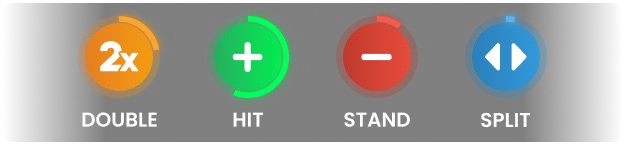
Once all the cards have been dealt, players can select the options on their hands (Hit, Stand, Double or Split).
After all players have made their decisions, the Dealer opens their hidden card and deals additional cards.
If the Dealer’s opened card is an Ace, an Insurance option is offered to all participating players before the options mentioned above. After the time for placing Insurance bets is over, the Dealer’s hand is checked for a possible Blackjack combination. If the Dealer has a Blackjack, the game round moves to the Result stage. If it is not a Blackjack, the game round moves to Blackjack Options stage.
When the Dealer finishes dealing cards to their own hand according to the rule above, the game round moves to the Result stage when Dealer’s hand is compared with the hands of each player participating in the game round, and the winner(s) is determined.
Once the game round is finished, the Dealer collects all the cards on the table, place them in the discard stack and open bets for the next game round.
Card Values
Live Blackjack is played with 8 decks of 52 cards and each card has a value. The total value of the cards in a player’s hand is called “hand points” and determines whether a Player’s hand or the Dealer’s hand wins.
- 2, 3, 4, 5, 6, 7, 8 and 9 all have their face value.
- 10, Jack, Queen, and King all have a value of 10.
- An Ace can have a value of either 1 or 11, chosen by the player. It is generally the combination of cards that dictates which value is chosen and this can change during a game round, depending on the value of any extra cards received.
Example combinations:
7♣ + 4♦ = 11, 5♣ + 10♠ = 15, K♥ + Q♣ = 20, A♣ + 5♥ = 6 or 16 and A♥ + 10♠ = BJ.
Any Ace + 10, J, Q or K combination is the best combination in the game and is called a Blackjack.
A combination of an Ace and any card with a value between and 2 and 9 is called a “soft hand” since
the value of an Ace in a such combination may be 1 or 11. For example, A♣ + 5♥ = 6 or 16.
The suits are of no importance in the main Blackjack game.
Placing Bets
When placing bets, please pay attention to the screen elements below to make sure your bets are placed on time and successfully validated.
The Table Name indicates the table you are currently playing at and the Table Limits show the minimum and maximum stakes allowed at the table. When clicking on this area, the Bet Limits & Payouts window is opened, showing minimum and maximum limits for each bet type as well as the payout odds.

The Game Information Indicator in the middle of the screen informs you of the game round status, the status of your bets, and will display guidance messages about actions you need to take.

“PLEASE, PLACE YOUR BETS” is shown to tell you when you may start placing your bets. The indicator bar shows the remaining time in green, which decreases from right to left. “LAST BETS” is shown when only 5 seconds of the betting time remain. This indicator is then in orange colour.
“BETS CLOSED” means that there is no more time to place bets and all betting areas become inactive.
After the betting time is over, you receive a “BETS ACCEPTED” message indicating that your bets have been accepted and you participate in the game round. Otherwise, you receive a message stating “NOT ALL BETS ACCEPTED” or “BETS REJECTED” in cases described in the “Game Inconveniences” section of this guide.
The “DEALING” message is shown when the Dealer is dealing initial cards and at the end of the game round when they deal cards to their own hand
The message “WAIT FOR NEXT GAME” is shown if you have no bets placed in the current game round. After this game round is over, you may place your bets during the next betting time.
A “LOW BALANCE” message on the status bar means that your balance is too low to cover the minimum bet amount allowed at the table. It is necessary to add funds to your balance to be able to participate in the game round.
A “GAME PAUSED” message appears if the game round is temporarily suspended due to Dealer failure, equipment failure, or other unforeseen circumstances.
A “GAME CANCELLED” message appears on the status bar if the game round is cancelled due to unforeseen circumstances and immediate resolution is not possible. For more information about “Game Cancelled” cases, please refer to the “Game Inconveniences” section of this guide.
The Chip Display allows you to select the value of the chips you wish to bet with. To see all available chip values, click on the chip in the lower part of the screen under the Rebet, Double and Undo buttons. Only chip values that can be used with your current Balance are available.

The Rebet button allows you to repeat the same bet(s) you placed in the previous game round at the current table. Once you have clicked Rebet, the Double and Undo buttons are enabled.

Clicking the Double button doubles the number of chips that you have placed on an available bet spot. Every click doubles your bet.

Clicking the Undo button removes the last bet you placed. This button is available only during the betting time. Once bets are closed, you are not able to undo or change your bets. Repeatedly clicking the undo button removes bets one by one, with the most recent bet(s) removed first.

The Balance indicator shows your available funds and the currency. It is always displayed in the bottom of the game window on desktop and mobile devices.
Please make sure that your balance is sufficient to cover your bets before you start playing.
If your balance is not updated after placing bets or after you see a win message, please try refreshing your game window in the browser.
The Cashier button (if applicable) located next to your Balance on desktop opens the Cashier window for deposits and withdrawals. On mobile devices the Cashier button is located inside the game Menu.

The Total Bet indicator shows the current total of all bets placed on the current game round. It is always displayed at the bottom of the game window.
Blackjack Options
Above the box where the cards were dealt, the hand points are shown in a small rectangle. When it’s time to select an option, the value is highlighted with a yellow colour and animated.

If your first two cards are an Ace and a Ten, Jack, Queen or King, your hand constitutes a natural Blackjack. You do not have to select a betting option as this is the best possible hand in the game.

All players at the table who received initial cards are asked to select one of the options described below.
The Stand option means passing directly to the next stage of the game round – Result – without asking for additional cards or investing any more funds. Players usually select this option when they are happy with their hand points. If you do not select an option during the options time, the Stand option is selected automatically. When you select Stand option you may be asked to wait until other players finish with their decisions.

Selecting the Hit option means making the attempt to improve your hand points by adding one more card to your initial two. After the Hit option is selected, the Dealer draws one new card from the shoe and deals it to your hand. This option can be selected several times until you decide to select Stand or until your hand points are equal to 21. If you reach 22 or more (Bust) you automatically lose your stake on the hand.

Doubling Down is a one-off move that can be statistically favourable, depending on your first two cards. It involves doubling your stake, in return for being dealt one additional card. After doubling, no further options will be offered on the hand and the game round either moves to the other player’s decisions, or the Dealer takes their turn. In some cases, you will be asked to wait until other players finish with their decisions.
In cases when the Double Down fails and is cancelled, the decision will revert to a Hit.

A Split option is offered if your initial two cards are of the same value including any two 10-point cards. By selecting Split you bet a stake equal to your main bet and your initial cards are split into two individual hands. The Dealer automatically gives a second card to your first hand and you may Hit, Double Down or Stand. Once the game is done on the 1st hand, the Dealer automatically deals a second card to your 2nd hand and waits for your next decision: Hit, Double Down or Stand.

When splitting Aces, each Ace gets only one additional card.
If you get a Ten-value card on top of a split Ace, then it counts as 21 points, not a Blackjack.
After you have selected the desired option for your hand, a mini icon showing that option appears next to your nickname.
In cases when the Split fails and is cancelled, the decision will revert to a Stand.
The Honest Decision feature becomes active, if you have not selected any option within the options time or in case of disconnection, and automatic selections will be done:
The “Stand” option is selected on your hand automatically if your hand score is 12 or more, and the “Hit” option is selected on your hand automatically if your hand score is 11 or less.
If Insurance offer is missed, the “No” option is automatically selected for your hand(s).
Player’s Statistics
The statistics on players are available in each game round showing how many players are active at the table, decisions taken by majority and the winners. This information is shown in the small window on the screen.
Once the betting time is over, the total number of players participating in the round is shown.

When the decisions time starts, this number decreases showing how many players have not made the decision yet
At the same time the Player’s Decision Statistics are shown as circle graphs around each available option, giving you an insight of the decisions that other players are taking. The exact percentages values are shown under each option
When the time for taking the decisions is over, the most popular decision taken is shown next together with the number of players who selected it.

After the game round has finished, the number of players that have won the game round is shown together with the Winners List

Insurance
Insurance is a special bet that are offered to place if the Dealer’s first card is an Ace, to insure your hand against a possible Blackjack for the Dealer. This insurance requires a stake of exactly half of the initial stake you placed, and it wins at odds 2 to 1 if the Dealer’s second card has a value of ten.
Additional betting time is offered to all players at the table to buy or not to buy Insurance.
By clicking YES, you have an “Insured” icon displayed next to the nickname.

By clicking NO, you choose not to insure your hand. If you do not select YES or NO during the time offered to buy Insurance, the option NO is selected by default.

After the Insurance time is over, the Dealer announces whether it is a Blackjack or not. If the Dealer has a Blackjack, the game round is over. Insured hands, therefore, are awarded a win.
If it is not a Blackjack, the game round continues normally. You lose your Insurance bets in this case; however, you still can win with your cards on the hand.
PLAYER DECISION STATISTICS on INSURANCE are shown as circle graphs around buttons YES & NO giving you an insight of the decisions that other players are taking during the “INSURANCE” time. The exact percentages are shown under each option.

Game Result
After all the players and the Dealer have made their moves, the game result is calculated by the game server for each hand in the game round.
The total win amount in the game round is shown in the win message.
All hands with more points than the Dealer win. If the Dealer has “Busted”, all players at the table win apart from those who “Busted” before the Dealer.
Please note: 21 with two cards (Blackjack) beats 21 on split Aces and 21 with 3 or more cards.
All winning hands (including split hands) have a “WIN” icon displayed next to them.

Players holding a Blackjack in their hand automatically wins unless the Dealer also has a Blackjack. Then the game round is known as a Push.
All hands with an equal number of points as the Dealer are categorized as PUSH hands. It means you do not win or lose money on that hand and your stake is returned to your balance.

Hand points higher than 21 automatically lose and are marked with a “BUST” icon.

Hand points lower than the Dealer’s – loses the game round and the Dealer wins. Losing hands have a “NO WIN” icon displayed next to them.

Hand points that consist in a number of six cards with a total value of 21 or less, automatically win through the “Six Card Charlie” rule. In the event of a Split decision, hands are counted individually.

The Winners List appears as soon as the Dealer’s hand reaches one of the above results, and it shows the nicknames of all the players who won at the current table in the last game round. The winning amounts are shown in the currency you selected for your account.
Side Bets
With side bet options, you can enhance your enjoyment – and potentially your bankroll – even if you lose the main bet in the game round. Side bets are placed on outcomes other than the result of the hand.

You may place side bets during the betting time but only after you have placed a main bet in the box.
You can also place on all side bets at once by clicking/tapping the “ALL SIDEBETS” button.

Side bet descriptions and payouts are available in the Bet Limits & Payouts window.
There are four the most popular Blackjack side bets offered in One Blackjack as 21+3, Bust Bonus, Perfect Pairs and Crazy 7 giving you the possibility to win at any time, even multiple times before the main Blackjack game is done:
TWENTY-ONE-PLUS-THREE (21+3) is a side-bet, which sees two of the most popular casino card games merged into one (Blackjack and Poker) and is based on a 3-card combination using the Dealer’s up-card and two initial cards on your hand to form a 3-card poker:
- Suited Trips – three cards of same ranking and of same suits (e.g. three Aces of Hearts);
- Straight Flush – three cards in sequence and the same suits (e.g. 10, Jack and Queen of Spades);
- Three of a Kind – three cards of the same rank (Queen of Hearts, Queen of Diamonds and Queen of Clubs);
- Straight – three cards in sequence but of different suits (Ace can be used to achieve an Ace, 2 and 3 Straight or Queen, King and Ace Straight);
- Flush – three cards of different rank but of the same suit (2, 6 and King of Clubs).
To win 21+3 side bet, place your bet in the specially designated box area marked with “21+3” before the cards are dealt and according to the table limits.
Winning side bets are shown right after two initial cards are dealt to the player’s hand.
In case of two winning combination of your hand, only the highest is paid.
The payout is calculated based on your bet multiplied by the odds according to the combination. The pay table is shown below.
| Combination | Payout |
| Suited Trips | 100 to 1 |
| Straight Flush | 40 to 1 |
| Three of a Kind | 30 to 1 |
| Straight | 10 to 1 |
| Flush | 5 to 1 |
BUST BONUS is a side-bet, which simply says that you are betting that the dealer will inevitably exceed 21. Whether it is with three, five or more cards, this bet will win with a dealer having too many on their hand. The pay-outs differ depending on how many cards it took for the dealer to bust with max payout 250:1. If a player has a Blackjack and the dealer doesn’t then the Bust Bonus bet will be returned to a player. There are 6 different outcomes when you can win with this side bet:
- Bust with 8+ cards – the Dealer has to bust after 8 or more cards are dealt to his hand;
- Bust with 7 cards – the Dealer has to bust after 7 cards are dealt to his hand;
- Bust with 6 cards – the Dealer has to bust after 6 cards are dealt to his hand;
- Bust with 5 cards – the Dealer has to bust after 5 cards are dealt to his hand;
- Bust with 4 cards – the Dealer has to bust after 4 cards are dealt to his hand;
- Bust with 3 cards – the Dealer has to bust after 3 cards are dealt to his hand.
To win on Bust Bonus side bet, please place your bet in the specially designated box area marked with Bust Bonus before the cards are dealt according to the table limits
Winning side bets is shown when the Game Round has finished.
The payout is calculated based on your bet multiplied on the odds according to the pair type. The pay table is shown below:
| Combination | Payout |
| Bust with 8+ cards | 250 to 1 |
| Bust with 7 cards | 100 to 1 |
| Bust with 6 cards | 50 to 1 |
| Bust with 5 cards | 9:1 |
| Bust with 4 cards | 2:1 |
| Bust with 3 cards | 1:1 |
Perfect Pairs (PP) is a side bet that is placed prior to any cards being dealt and gives you the opportunity to win additional money if your two initial cards constitute a pair. There are 3 different types of pairs:
- Perfect Pair – two identical cards (e.g. two Queens of Hearts);
- Coloured Pair – two cards of the same rank and colour but different suits (e.g. 2 of Hearts + 2 of Diamonds);
- Mixed Pair – two cards of the same rank but different colour, e.g. 2 of Spades + 2 of Diamonds.
To win a Perfect Pair side bet, place your bet in the specially designated box area marked “PP” before the cards are dealt, according to the table limits.
Winning side bets is shown immediately after two initial cards are dealt to each box participating in the game round.
A winning PP hand is not affected by the Dealer’s hand.
The payout is calculated based on your bet multiplied by the odds for the pair type. The pay table is shown below:
| Combination | Payout |
| Perfect Pair | 25 to 1 |
| Coloured Pair | 12 to 1 |
| Mixed Pair | 6 to 1 |
CRAZY 7 – is a side-bet that is decided by evaluating the player’s first three cards. If the first card is a 7, the player wins a payout 5 to 1. If the second card is also a 7, the payout is higher. If the player hits or splits the hand, and the third card is also a 7, the payout grows even higher. And the highest payout 2000 to 1 is paid if the sevens are suited.
- 7-7-7 Suited – three 7’s of the same suit (e.g. three 7 of Hearts);
- 7-7-7 (Unsuited) – three 7’s of different suit (e.g. 7 of Hearts, 7 of Clubs and 7 of Diamond);
- 7-7 Suited – two 7’s of the same suit (e.g. two 7 of Clubs);
- 7-7 (Unsuited) – two 7’s of different suit (e.g. 7 of Clubs and 7 of Diamond);
- 7 – any 7 of any suits (e.g. 7 of Spades).
There are also two considerations for the Crazy 7 side bet:
- When splitting 7’s, if the second card dealt to the first hand is a 7, it counts as card number three.
- If the Dealer “peeks” for Blackjack and he does have it, you are not able to request a 3rd card on your hand to reach a possible 7-7-7.
To win on Crazy 7 side bet, place your bet in the specially designated box area marked with Crazy 7 before the cards are dealt according to the table limits.
Winning side bets is shown when the Game Round has finished.
The payout is calculated based on your bet multiplied on the odds according to the combination type. The pay table is shown below:
| Combination | Payout |
| 7-7-7 Suited | 2000 to 1 |
| 7-7-7 | 500 to 1 |
| 7-7 Suited | 150 to 1 |
| 7-7 | 25 to 1 |
| 7 | 5 to 1 |
Navigation Controls
The Lobby button can be selected at any time from any game. It allows you to easily change the game table, select any other live game or simply leave the table. You will not be removed from your current table until you have selected the new game table you wish to join. You can use the Lobby to browse other games while remaining at the current table. Once on the Lobby page, please click/tap the Close Lobby button to exit the Lobby page and return to your open table.

Clicking/tapping the Chat button opens the chat window. You can chat with the Dealer and other players. The dealer will communicate with you directly and answer any questions regarding the game.

If you wish to speak with the Live Support, please select the corresponding chat room by clicking/tapping the Support button, and you will be assisted in a private chat.

Chat messages are monitored by dedicated Customer Support personnel at all times. Players who misuse Chat by abusing the Dealer or other players, or by using inappropriate and/or offensive language might have their chat privileges disabled.
Clicking/tapping the Volume Control button opens a slider and lets you adjust the sound volume at your table. Click/tap the Volume control button to mute the sound. To unmute, click/tap the Volume Control button icon again.

Click/tap the History button to launch a window showing details of your gaming activity. By default, it will open your history for today. Under the tab Older you can view your previous gaming history.

Simply select a game round from the list to review it in detail, arranged by game round information and information about bets.
Clicking/tapping the Game Help button opens the Help window.

Click/tap the Settings button to open the Settings window allowing you to select your preferences.

Under the tab General following settings are available:
- Manage video quality
- Manage video sounds
- Manage game sound effects
Clicking/tapping the Classic View button changes the game view to Classic mode, showing the video inside a small frame. Below the video, the virtual table with graphical cards displayed for each side will be available.

The game interface may also change automatically to Classic mode if your internet connection is slow or unstable. If this happens, the video will be automatically set to Low video resolution.
Click/tap the Full Screen button to launch the Full Screen mode. To exit this mode, click/tap the button again or use the “Esc” key on your keyboard.

Subtitles
Subtitles may not be completely accurate. Please refer to the information from the in-game user interface as the primary source.
Cards Shuffle and Cards Change
Deck shuffling occurs once the postillion (cutting card) is removed from the shoe and the game round has been completed.
When the cutting card appears during play, it is removed, and the hand completed. The Dealer will announce “The last hand of the shoe”. Upon completion of this hand, no more cards should be dealt until the shoe change or shuffle procedure occurs.
Cards must be shuffled (mixed) by a Shuffler on the accessory table or by the Dealer at the gaming table, according to the established procedure.
The cards change procedure takes place at each card game table once every 24 hours. However, it shall also be done in the following cases:
- Table has been opened after a period of inactivity;
- Video stream was not available at the table;
- More than three cards fell to the floor during the game round;
- A card with defective barcode is present in the shoe.
Game Inconveniences
You are personally responsible for the correct positioning of wagers on ONE Blackjack table.
In the event of any technical malfunction or human error, it is reported to the Shift Manager immediately.
If any error in the game procedure occurs, the game round is temporarily paused, and the Shift Manager is notified. You will be informed by an on-screen notification that the issue is being investigated.
If the Shift Manager can immediately resolve the error (e.g. by rescanning the cards, placing the cards in the correct positions, etc.) the game round continues as normal.
If immediate resolution is not possible, the game round is cancelled, and initial bets are refunded to all players who participated in the game round.
If the game round must be cancelled for any reason and you hold a correctly dealt Blackjack in your hand, you will be paid through Casino Customer Support, as long as the Dealer’s open card is not an Ace or a 10-value card.
If the game round must be cancelled and your side bets were confirmed as winning, the win amount will be credited to your account through Casino Customer Support.
If more than three cards fell to the floor, the Cards change procedure must be performed.
A bet may be rejected by the system after the betting time has finished due to not being placed in time, not meeting the minimum or maximum requirements, or to other transaction issues.
In case, your bet is lower than the permitted minimum bet limit specified in the Bet Limits & Payouts window, it appears as an inactive chip. You will be informed about this in the small tooltip above your bet.
Once the betting time is over, all bets lower than minimum permitted bet limit are rejected.
If case, your bet exceeds any maximum bet limit, it is adjusted automatically, and you will be informed about this in the small tooltip window above your bet.
If you wish to discuss any game related issues, please contact Live Support, providing them with details of the game in question including the the game name and the exact time it occurred.
Disconnection Policy
Pragmatic Play Live Casino services are delivered over the Internet, and occasionally disconnections may occur.
After being disconnected, check your winnings in the History window. If you have any questions regarding the game outcomes, please contact Live Support within the game or Casino Time Customer Support, providing them with details of the game in question including the the game name and the exact time it occurred.