


Introduction
Big Small Baccarat is a variation of Baccarat – one of the oldest and most renowned casino games worldwide. It is particularly popular among high-rollers and players from Asia, favoured for its simplicity and exciting playing experience.
The objective of the game is to predict which side (Player or Banker) wins by having a hand whose value is closest to 9.
In this variant, you can also place 6 additional Big/Small side bets based on the combined number of cards dealt to the Player and Banker.
How to Play
To play, select a bet amount to bet on Player, Banker, or side bets. You can place or modify your bets until the betting timer runs out.
The Dealer then deals 4 initial cards in the following order: 1st and 3rd card to the Player’s side and 2nd and 4th card to the Banker’s side. Once the betting timer expires, the Dealer scans 4 initial cards dealt to the Player and Banker, starting with the Player.
If a 3rd card is needed by either side, the Dealer deals the additional card according to the Third Card Rule explained below.
When all the necessary cards are dealt to each hand, the game round is complete. The side with a hand value closer to 9 wins. If the value of both hands is equal, the game round ends in a Tie.
The winning bet spots will be highlighted, and you will be paid according to the type of bets you placed. Your winnings will be displayed on your screen.
Once the game round is finished, all cards on the table are collected and discarded, and bets are opened for the next game round.
Card Values
The game is played with 8 standard 52-card decks.
Only the numerical value of each card is relevant in the game: the suit of cards (diamonds, hearts, spades, or clubs) is irrelevant.
| Cards | A | 2 | 3 | 4 | 5 | 6 | 7 | 8 | 9 | 10 | J | Q | K |
| Points | 1 | 2 | 3 | 4 | 5 | 6 | 7 | 8 | 9 | 0 | 0 | 0 | 0 |
The value on the Player and Banker sides is calculated by adding up the points of the cards.
The maximum possible point score is 9. Each hand’s value is calculated by dropping ten digits in a hand otherwise worth 10 or more.
For example:
- 5 + 5 = 10 – 10 = 0
- 8 + 7 = 15 – 10 = 5
- J + K = 0
- 1 + 5 + 8 = 14 – 10 = 4
- 8 + Q = 8
- 9 + 9 = 18 – 10 = 8
The Third Card Rule
There are three cases when a game round is over after dealing 4 cards (Small hand) with no additional cards needed:
- Player’s or Banker’s first 2 cards are equal to 8 or 9 points in total (Natural hand).
- Player has 6 points, and Banker has 7 points or vice versa.
- Tie on 6, 7, 8 or 9 points.
If Player and Banker receives an initial two-card hand worth 0-7, the Third Card Rule is consulted to determine if the third card is to be dealt to either of hands. The Player always goes first.
For the Player’s hand to draw:
| If the Player’s two cards total: | Behaviour |
| 0, 1, 2, 3, 4, 5 | Player draws the third card |
| 6, 7 | Player stands |
| 8, 9 (Natural) | Both hands stand |
For the Banker’s hand to draw:
| Banker’s initial two cards | Value of third card drawn by Player | ||||||||||
| No third card | 0 | 1 | 2 | 3 | 4 | 5 | 6 | 7 | 8 | 9 | |
| 0 | D | D | D | D | D | D | D | D | D | D | D |
| 1 | D | D | D | D | D | D | D | D | D | D | D |
| 2 | D | D | D | D | D | D | D | D | D | D | D |
| 3 | D | D | D | D | D | D | D | D | D | S | D |
| 4 | D | S | S | D | D | D | D | D | D | S | S |
| 5 | D | S | S | S | S | D | D | D | D | S | S |
| 6 | S | S | S | S | S | S | S | D | D | S | S |
| 7 | S | S | S | S | S | S | S | S | S | S | S |
| 8 | S | S | S | S | S | S | S | S | S | S | S |
| 9 | S | S | S | S | S | S | S | S | S | S | S |
D – Draw; S – Stand
If the Player’s first two cards equal 6 or 7 points in total, but the Banker’s first two cards equal 0, 1, 2, 3, 4 or 5 points in total, the Banker must draw an extra card.
Main Bets
The main bets are Player and Banker. The hand that has the highest total card value wins.
If the Player and Banker hands have the same value, the round ends in a Tie outcome. In the event of a Tie, bets on Player and Banker will not lose and will be pushed.
Bets can be placed on the betting grid, displayed on your screen. A winning bet on Player is paid at 1:1.
A winning bet on Banker is paid at 0.95:1.
Placing bets on the Player and Banker betting spots may be a subject to opposite betting blocking.
Side Bets
In addition to the main bets, you can also bet on the optional side bets. Betting on side bets requires placing a main bet first. You can bet on any or all side bets in the same game round.
- Big Player
- Small Player
- Big Banker
- Small Banker
- Big Tie
- Small Tie
Betting limits apply to all side bets. Additional restrictions may be applied to the maximum bet on side bets after a specific number of rounds. This amount will not exceed a set percentage of the cumulated main bets. See Payouts & Limits for more information.
Big/Small Player
The Big/Small Player side bets are settled based on the combined number of cards dealt to both the Player and Banker when the Player wins.
The Big Player side bet wins when the round’s result is a Player win and the total number of cards dealt is 5 or 6.
The Small Player side bet wins when the round’s result is a Player win and the total number of cards dealt is 4.
| Outcome | Payout |
| Big Player | 2.45:1 |
| Small Player | 4.50:1 |
Big/Small Banker
The Big/Small Banker side bets are settled based on the combined number of cards dealt to the Player and Banker when the Banker wins.
The Big Banker side bet wins when the round’s result is a Banker win and the total number of cards dealt is 5 or 6.
The Small Banker side bet wins when the round’s result is a Banker win and the total number of cards dealt is 4.
| Outcome | Payout |
| Big Banker | 2.30:1 |
| Small Banker | 4.50:1 |
Big/Small Tie
The Big/Small Tie side bets are settled based on the combined number of cards dealt to the Player and Banker when the outcome is a Tie.
The Big Tie side bet wins when the round’s result is a Tie and the total number of cards dealt is 5 or 6.
The Small Tie side bet wins when the round’s result is a Tie and the total number of cards dealt is 4.
| Outcome | Payout |
| Big Tie | 15:1 |
| Small Tie | 25:1 |
Placing Bets
The Table Name indicates the table you are currently playing at, and the Table Limits show the minimum and maximum bets allowed at the table.
When clicking/tapping this area, the Payouts & Limits window opens, showing the minimum and maximum limits and payout odds for each bet type.
 The Game Information Indicator informs you of the game status.
While the timer is displayed, you may place and modify your bets.
The Chip Display allows you to select the value of the chips you wish to bet with. Only chip values that can be covered with your current Balance are available.

 The Rebet button allows you to repeat the same bets from the previous game round. Once you have clicked/tapped the Rebet button, the Double and Undo buttons are enabled.
 The Double button doubles all your placed bets. Every click/tap doubles your bets up to the maximum limit.
 The Undo button removes the last bet you placed. This button is available only during the betting time. Once bets are closed, you will not be able to undo or change your bets. Clicking/tapping the Undo button repeatedly removes bets one by one, with the most recent bet removed first.
 The Balance indicator shows your available funds and currency. Your balance has to be sufficient to cover all your placed bets.
If your balance is not updated (after placing bets, losing or winning), please refresh your game.
 The Cashier button opens the Cashier window for deposits and withdrawals. On mobile devices, the Cashier button is available inside the game Menu.
 The Total Bet indicator shows the total value of all bets placed in the current game round.
Each game round is identified by a unique Game name. The Time indicator shows your current local time.
Baccarat Multiplay
Baccarat Multiplay mode allows you to play on multiple Baccarat tables simultaneously within a single window. You can monitor the game progress at each table, analyse game statistics, and select your preferred road patterns.
Entering Baccarat Multiplay mode
Baccarat Multiplay mode, available on mobile and desktop devices, can be launched from the Baccarat Lobby or any Baccarat table.
To access this mode from the Lobby, simply click/tap the Play Now button. This will replace the Lobby view with a window that displays all available Baccarat tables for Multiplay.
After entering the Multiplay mode, you will see a list of all the Baccarat tables that are currently available.
 To enter Baccarat Multiplay mode from a currently opened table, click/tap the MULTIPLAY mode icon.
Multiplay mode is then launched in a small window.
 To close the Multiplay mode window, click/tap the X.
Once Baccarat Multiplay is launched, a Multiplay panel opens featuring two tabs: All Tables and Good Roads. The All Tables tab is opened automatically, displaying all available Baccarat tables where you can observe road trends and sort the tables for the longest streaks.

Click/tap the Filter button to find tables by searching with keywords or using one of the preset filters.
 Click/tap the Refresh button to sort the tables easily by the longest streak for your chosen road view. The number in a red badge indicates the number of new tables with the longest streak since the last table list refresh.
Good Roads
In the Good Roads tab, tables are displayed based on enabled default or custom winning streak patterns. When any monitored Baccarat table matches any of your tracked patterns, it will appear in this tab. Once a table’s streak no longer aligns with your set patterns, it is removed from the Good Roads tab.
When placing bets in the All Tables tab, the Good Roads tab will display a notification if a table matching any of your patterns appears.
Settings and preferences for patterns can be configured under Good Roads Settings. There are two sections in Good Roads Settings:
- Default — contains 12 preset patterns. These patterns cannot be edited or deleted.
- Custom — this is where you can add up to 9 patterns you create.
 — Pattern is enabled — Pattern is enabled |
 — Pattern is disabled — Pattern is disabled |
Good Roads Custom Builder
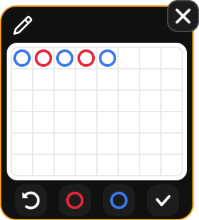
The Good Roads Custom Builder allows you to create, save, and track customised streak patterns on 6×8 Big Road grids.
Click/tap Create New to add a custom pattern.

The first pattern you create will appear as “My Pattern 1”. You can change the name, save, delete, and edit patterns using controls displayed on the grid.
 Click/tap the Banker (red) and Player (blue) buttons to mark outcomes on your custom road pattern.
Click/tap the Undo button to revert the last change and make sure to save (checkmark) your pattern before exiting.
Good Roads tracking
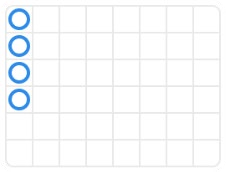
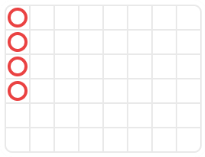
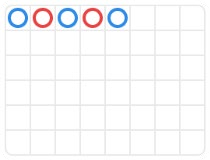
The Multiplay feature allows you to track up to 9 custom patterns and the following 12 default Good Roads:
Streak Player
Streak Banker
Ping Pong Player
Ping Pong Banker
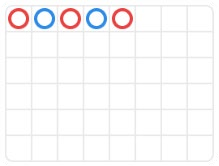
One Two Player
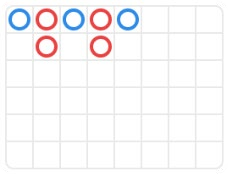
One Two Banker
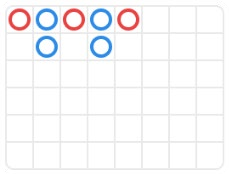
Sandwich Player
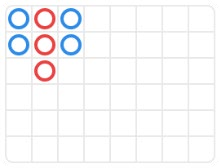
Sandwich Banker
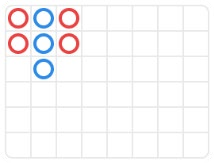
Separated Player
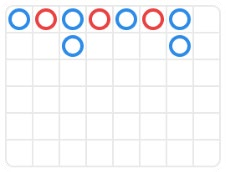
Separated Banker
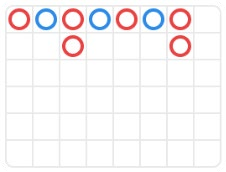
Switch with Player
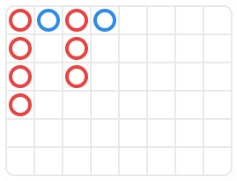
Switch with Banker
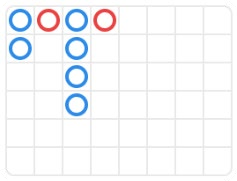
 Click/tap the Good Roads Settings button to select the Good Road patterns you wish to track, you will be automatically notified when the selected patterns occur.
Placing Bets
The bets can be placed at any table on the main bet spots Player, Banker, and Tie until the betting timer runs out. Other side bets can be enabled via additional settings.
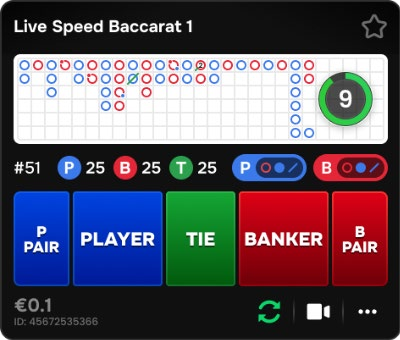
The Total Bet placed on a table is shown next to the table limits after placing a chip on any bet spot. The minimum bet limit is shown at the bottom left of each table’s Multiplay game panel.
The Chip Display allows you to select the value of the chips you wish to bet with. Only chip values that can be covered with your current Balance are available.
 The Rebet button allows you to repeat the same bets from the previous game round. Once you have clicked/tapped the Rebet button, the Double and Undo buttons are enabled.
 The Double button doubles all your placed bets. Every click/tap doubles your bets up to the maximum limit.
 The Undo button removes the last bet you placed. This button is available only during the betting time. Once bets are closed, you will not be able to undo or change your bets. Clicking/tapping the Undo button repeatedly removes bets one by one, with the most recent bet removed first.
 The Star icon in the top corner of each Multiplay game panel, pins the table to the top of your Multiplay table list. Click/tap to pin/unpin the table at any time. When a game is pinned, the star is golden.
 To see the rest of the available options for a particular table, click/tap the Table Settings icon.
A drop-down Menu then opens and includes the following options:
- Pin Table – click/tap to pin tables to the top of the list and exclude them from being sorted by the longest streak. You can unpin them at any time.
- Table Limits – click/tap to view the limits of this table.
- Join Table – click/tap to join the table and play in full view.
- Hide Table – click/tap to hide the selected table from the existing table list. You can always unhide it via Settings.
When the betting timer is over, the cards are dealt.
Once the game result is determined, the tables you have won at are highlighted. Your payout is calculated based on your placed bet types.
Summary
 Click/tap the Summary icon to view a detailed overview of active bets, in-progress Autobet, and last results.
Managing video stream
 Click/tap the Video icon to switch the video stream on/off at any table.
 You can activate the video stream for only one table at a time. This table is automatically placed at the top of the window. If the video is muted, use the sound toggle to unmute.
Game Settings
 Click/tap the Settings button in the Multiplay window and open the Game tab.
Here, you can adjust your game preferences, including:
- Side bets
- Only roads view
- Extra statistics
- Scoreboard themes
Additionally, under the Game tab you can hide/unhide tables from the existing table list in Multiplay.
Light/Dark Scoreboards
 Scoreboards are displayed in the Light theme as default. You can click/tap the Light/Dark theme button to enable/disable the Dark scoreboards.
Managing Road statistics
In the Multiplay mode, you have two viewing options for Baccarat table statistics: Big Road or Derivatives.
 Click/tap the Roads button to switch between the two. The Big Road is displayed by default for all Baccarat tables.
Menu items in Multiplay
- Lobby
- Cashier (if applicable)
- Player History
- Baccarat Game Help – includes the guide to Multiplay mode.
- Click/tap the Settings button to open the Settings window allowing you to select your preferences.
- Click/tap the Full Screen button to launch the Full Screen mode. To exit this mode, click/tap the button again or use the “Esc” key on your keyboard.
 On mobile devices, these items can be found under the Menu.
Roadmaps
Baccarat trends and streaks are recorded on “roads”. These pictorial representations of past round results and other statistics regarding the current shoe may serve as a guide but are not indicative of future outcomes.
A Baccarat roadmap begins when the first game round of the new shoe is dealt and continues until the cutting card appears. When the last hand of the shoe is dealt, all current record in the roadmap is cleared.
When a new shoe is started, the process starts from the beginning. There are five traditional roads available:
- Big Road
- Big Eye Boy
- Small Road
- Cockroach Road
- Bead Plate
Big Road
The Big Road is the main road which all other roads are derived from. Symbols on the Big Road:
| Icons |  |  |  |  |  |  |
| Meaning | Player won | Banker won | Tie won after Banker | 2 consecutive Ties | Player Pair won | Banker Pair won |
When the shoe begins, the first result is recorded in the top-left corner of the Big Road. If the next result is the same side as the first, it is recorded under it. Otherwise, a new column is started, and it continues in the same way throughout the entire shoe. As a result, the Big Road becomes a series of columns of empty circles – blue for Player and red for Banker.
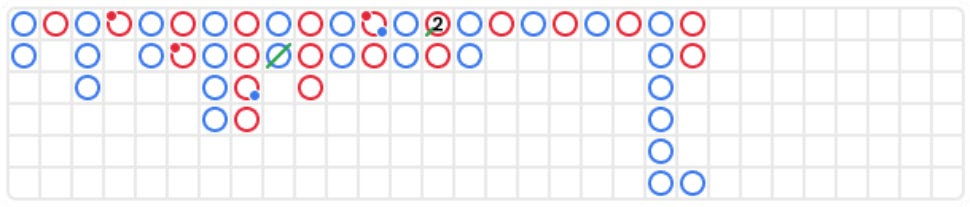
On the Big Road, a Tie is not displayed in a separate cell, but simply as a green line across the most recent result. If there are multiple ties, a small number is displayed next to the green line, representing the number of ties. If a Tie occurs before there has been a result in favour of the Banker or Player, the green Tie line is shown in the very top-left cell on the grid, and when the first Banker or Player result is known, that circle is shown in the same cell under the Tie line.
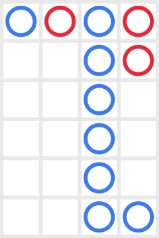
If there are more than six consecutive Banker or Player wins, it is called “the dragon”. Thus, a popular Baccarat strategy is to “follow the dragon” and take this trend into account when betting.
The Derived Roads
The Big Eye Boy, Small Road and Cockroach Road are all derived from the Big Road and show the various patterns in it. Derived roads serve as the “predictive roads” and show whether there were any patterns.
The derived roads are built of red and blue symbols: empty circles for the Big Eye Boy, solid circles for the Small Road, and slashes for the Cockroach Road.
The red and blue symbols do not correspond to Banker or Player. Red indicates that there is a pattern, and blue indicates that the shoe is “choppy” with no pattern.

The derived roads do not start at the very beginning of the shoe. They start with the hand following the first hand in the second, third and fourth columns of the Big Road:
- For Big Eye Boy: the second result in the second column.
- For Small Road: the second result in the third column.
- For Cockroach Road: the second result in the fourth column.
Once a derived road starts, an additional red or blue symbol is added to that road after every hand. Click/tap on any of the derived roads to zoom in on the road content.
Bead Plate
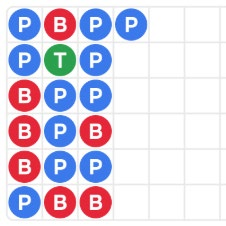
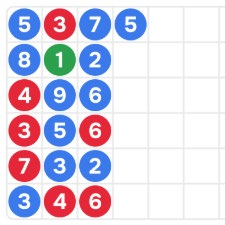
The Bead Plate is an exact representation of every hand of the shoe. A Tie is shown in a separate cell in the Bead Plate and is marked with a green circle.
| Icons |  |  |  |  | |
| Meaning | Player won | Banker won | Tie won | Player Pair won | Banker Pair won |
The first symbol appears in the top-left corner of the grid, and the road is filled vertically down through all six cells of the column. A new column is begun once the previous column has been filled, irrespective of the result of each hand.
By clicking/tapping on the Bead Plate statistics area, you will see the results, represented by letters, corresponding to the winning result (Player, Banker, Tie) or with numbers corresponding to the value of the winning hand.
Roadmap Probing (Ask Player, Ask Banker)
Roadmap Probing helps players in predicting the outcome of the next round. It shows the trends in the Big Road, Big Eye Boy, Small Road, Cockroach Road and Bead Plate if either a Player or a Banker result were added.
Click/tap the Ask Player or Ask Banker button to see the trends, if the next result were a Player or Banker win, respectively.

The symbols on the buttons represent the most recent symbol in each of the derived roads.
Navigation Controls
 The Lobby button can be selected at any time from any game. It allows you to easily change the game table, select any other live game or simply leave the table. You will not be removed from your current table until you have selected the new game table you wish to join. You can use the Lobby to browse other games while remaining at the current table. Once on the Lobby page, please click/tap the Back to game button to exit the Lobby page and return to your open table.
Multi-Table Play
Join multiple game tables simultaneously in the same browser window!
After entering a game table, click the +TABLE button in the game and choose up to four tables you would like to join or go to LOBBY and use the +TABLE button next to your preferred tables to join them.
Note: some tables may not offer multi-table play mode and will not display a +TABLE button.

Once you have joined multiple tables, you can resize the entire browser window but not each game table separately.
To leave a table, simply click/tap the X button. Exiting one table does not affect your participation in others.
Joining the same table from a different device or browser will automatically exit you from the table on the first device. Clicking directly on a table icon instead of the +TABLE button will switch tables without adding a new one.
 Clicking/tapping the Chat button opens the chat window. You can chat with the Dealer and other players. The dealer will communicate with you directly and answer any questions regarding the game.
 If you wish to speak with the Live Support, please select the corresponding chat room by clicking/tapping the Support button, and you will be assisted in a private chat.
Chat messages are monitored by dedicated Customer Support personnel at all times. Players who misuse Chat by abusing the Dealer or other players, or by using inappropriate and/or offensive language might have their chat privileges disabled.
 Clicking/tapping the Volume Control button opens a slider and lets you adjust the sound volume at your table. Click/tap the Volume control button to mute the sound. To unmute, click/tap the Volume Control button icon again.
 Click/tap the History button to launch a window showing details of your gaming activity. By default, it will open your history for today.
Simply select a game round from the list to review it in detail, arranged by game round information and information about bets.
 Clicking/tapping the Game Help button opens the Help window.
 Click/tap the Settings button to open the Settings window allowing you to select your preferences.
Under the tab General following settings are available:
- Video stream on/off
- Manage video quality
- Manage video sounds
- Manage game sound effects
Under the Game tab the following settings are available:
- Show/hide betting statistics
- Show/hide hand totals on betboard
- Enable/disable Dark scoreboards mode
- Enable/disable Extra side bets
Enabled side bets can be disabled only if they are not covered by bets. Hand totals on the betboard are hidden by default.
 Clicking/tapping the Classic View button changes the game view to Classic mode, showing the video inside a small frame. Below the video, the virtual table with graphical cards displayed for each side will be available.
The game interface may change automatically to Classic mode if your internet connection is slow or unstable. If this happens, the video will be automatically set to Low video resolution.
 Click/tap the Full Screen button to launch the Full Screen mode. To exit this mode, click/tap the button again or use the “Esc” key on your keyboard.
In portrait mode on mobile, click/tap on the Immersive icon to switch to the immersive game view that hides the roads.


Subtitles
Subtitles may not be completely accurate. Please refer to the information from the in-game user interface as the primary source.
Card Shuffle and Change
Deck shuffling occurs once the cutting card is removed from the shoe and the game round has been completed.
When the cutting card appears during the play, it will be removed. The Dealer then informs that this is the last hand of the shoe, thus completing the hand. Upon completing this hand, no more cards are dealt until the shoe change or shuffle procedure occurs.
Cards are shuffled by a Shuffler on the shuffling table or by the Dealer at the gaming table, according to the shuffling procedure.
The shoe change procedure can be initiated before the cutting card is removed at the sole discretion of the shift management.
The card change procedure occurs once every 24 hours or, additionally, in the following cases:
- Table has been opened after a period of inactivity.
- Video stream was unavailable at the table.
- More than three cards fell on the floor during the game round.
- A card with a defective barcode is present in the shoe.
Game Inconveniences
If there is an error in the game, system, game procedure or transaction activity, the game round will be temporarily paused, and the Shift manager immediately notified. You and other players will be informed by an on-screen notification that the issue is being investigated.
If the error can be immediately resolved, the game round will continue as usual. If immediate resolution is not possible, the game round will be cancelled, and initial bets will be refunded to all players who participated in the game round.
If you wish to discuss any game related issues, please contact Live Support, providing your Game name.
Disconnection Policy
Pragmatic Play Live Casino services are delivered over the Internet, and occasionally disconnections may occur.
After being disconnected, check your winnings in the History window. If you have any questions regarding the game outcomes, please contact Live Support within the game or Casino Customer Support, providing your Game name